
Plans and phases
A plan has a name, a start date and a status (draft, active or archived), and only one plan is treated as active at a time.
A phase inside it has a name, a colour, start and end dates, a free-text intent, and an order. Phases can be built from a template catalog with suggested names, intents, lengths and colours, or written from scratch. From any date the app can tell you which phase you are in, which week of it (1-based), and how far through it you are.
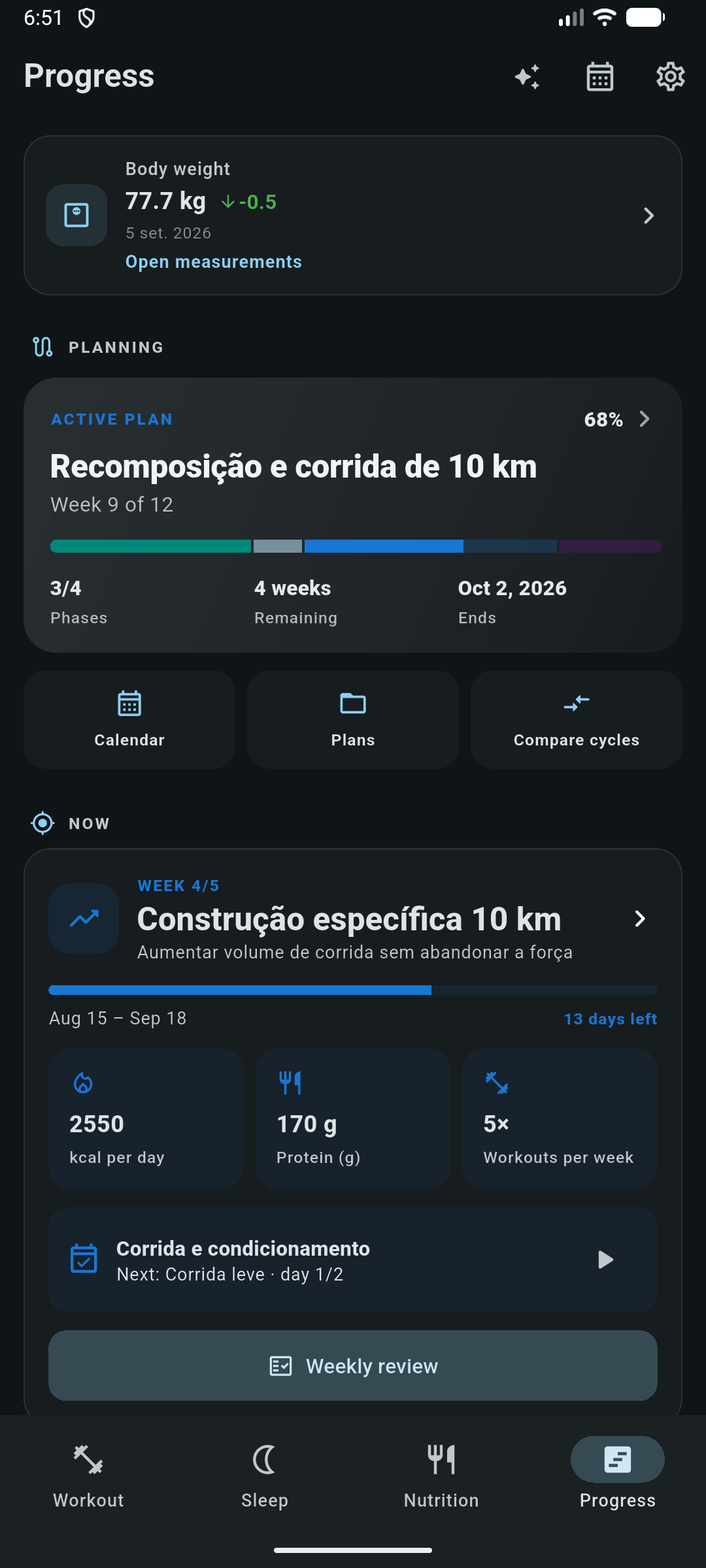
The Plan tab can be hidden in settings. Workouts, runs, nutrition and sleep do not depend on a plan existing; periodization is a layer on top, not a prerequisite.
Targets
Each phase carries targets, and they are versioned: when you change a target mid-phase, the previous version is kept with the date it stopped applying. Metrics for a given day resolve the version that was in force on that day, so adjusting a phase in week 4 does not retroactively rewrite whether you hit week 2.
| Group | Targets |
|---|---|
| Nutrition | Calories, protein, carbohydrate, fat |
| Training | A linked routine, planned workouts, planned set range |
| Running | Sessions per week, weekly distance, long-run distance, quality sessions per week |
| Body & recovery | Weight trajectory and average sleep, both read against what you logged |
When you open the phase form, it pre-loads your latest body weight and your active nutrition target so you are editing from real starting values. Saving reports back one of three outcomes (saved, date overlap with another phase, or macro conflict), so a bad phase is rejected with a reason instead of silently accepted.
A phase can also schedule a run plan into itself, which materialises that plan's sessions onto the phase calendar. The action returns what it created, so it can be undone.
Adherence metrics
Metrics are computed for a whole phase and for a single week. Every
adherence figure is actual ÷ planned × 100, clamped to
0–100, and is omitted rather than shown as zero when no
target exists for it. The range is always clipped to today, so an unfinished
phase is not judged on days that have not happened.
| Area | Reported |
|---|---|
| Training | Workout count, completed sets, volume, set adherence and workout adherence. When targets name a routine, only workouts from that routine count |
| Nutrition | Days logged against target days, average calories and macros, adherence and coverage |
| Weight | Starting and ending weight, total change, weekly change percentage and adherence to the planned rate |
| Sleep | Average hours, adherence and coverage |
| Effort | Average RPE with the number of sets it is based on |
| Running | Run count, distance, moving time, longest run and quality runs, against the planned sessions, distance, long run and quality count |
A weekly running target is summed per week weighted by how many days of that week fall inside the range you are looking at. A 40 km per week target never turns into 280 km because you asked for a seven-week phase, and a planned long run takes the maximum rather than a sum.
A quality run is one linked to a plan workout of kind tempo, interval, fartlek, hills or race. Ad-hoc runs still count toward volume, distance and time; they simply do not count as quality work you planned.
Weekly check-ins
One check-in per phase per week. Before you fill it in, the screen shows that week's metrics next to the targets that were in force, so you are reviewing evidence rather than impressions.
- Energy
- 1 to 5.
- Hunger
- 1 to 5.
- Recovery
- 1 to 5.
- Performance
- How the training itself went, defaulting to stable.
- Decision
- Maintain, adjust or end the phase: the point of the whole exercise.
- Notes
- Optional free text.
Saving also stores a snapshot of that week's metrics and the targets that applied. Later edits to the phase cannot rewrite history: the check-in keeps the numbers you actually decided on.
Projections and suggestions
- Projection: current weight, expected weight at the end of the phase, an estimated date for reaching your goal, and planned volume and workouts. The weight projection can be based either on your observed trend or on the rate you planned.
- Today's session: given the phase week and the weekday, the app resolves which routine day and which planned run belong on this date, preferring an already-scheduled run when one exists.
- Phase calendar: browse the phase day by day and create a planned future workout on any date.
- Comparison: put one cycle against another and see what changed.
Metrics that read newer tables (run plans in particular) check that those tables exist before querying. A device that has not migrated yet renders the phase without the running section instead of erroring.
How it connects
- Routines supply the planned training sessions a phase measures against.
- Run plans can be scheduled into a phase so both blocks share a calendar.
- Nutrition targets are overridden field by field by the active phase week.
- Body measurements and sleep supply the weight and recovery figures.