
The daily view
The Nutrition tab opens on today. At the top sit the day's totals against your target; below that a tools row for progress, saved meals, the food library and settings; below that a panel with one row per meal type.
Meal types are yours to define: three meals, six, or "pre-workout" and "post-workout" if that is how you eat. Each row has a plus button that opens food search already bound to that meal. If you delete a meal type that still has entries, those entries keep showing rather than disappearing with the type.
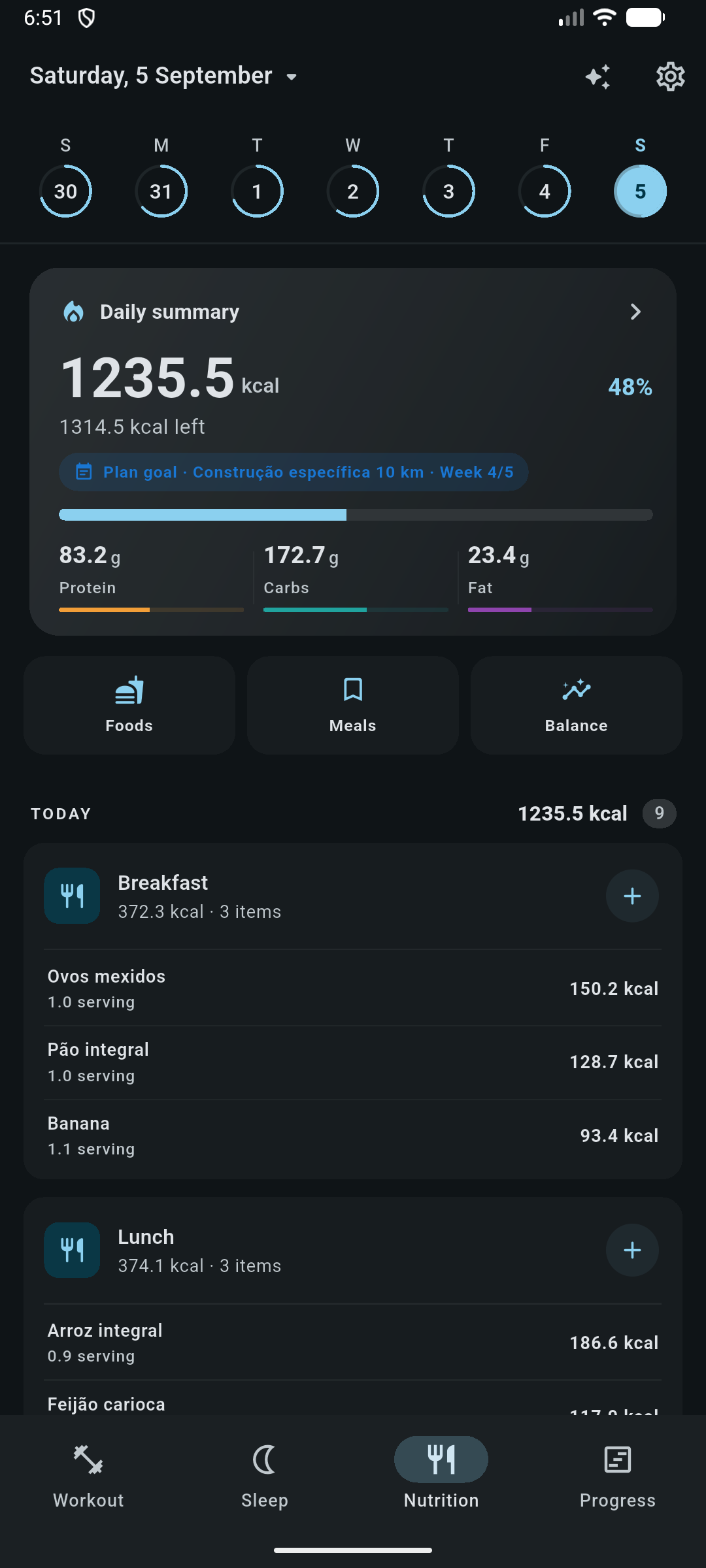
A replicate day action copies a day's meals to another date, the fastest way to log a week that repeats.
Adding food
- Search by name
- Searches your own library first, and can query Open Food Facts for products you have not saved yet.
- Barcode
- Scan a product barcode and look it up directly. Android only.
- Label photo
- Photograph a nutrition label and get a pre-filled draft to review. Uses the AI provider you configured. See AI Coach.
- Manual entry
- Type a food in yourself, with as many or as few nutrients as you know.
- Saved meals
- Log a whole combination (the bowl you eat every morning) in one action.
After picking a food, a quantity sheet asks how much. Foods can have multiple variants (whole versus skimmed, raw versus cooked) and named servings (a slice, a scoop, a can), so you record what you actually ate rather than converting to grams in your head.
Nutrients tracked
Beyond calories and the three macros, a food can carry saturated, monounsaturated, polyunsaturated and trans fat, fibre, sugars, sodium, potassium, calcium, iron, magnesium, zinc, and vitamins A, C, D and B12.
A nutrient you never filled in is stored as unknown. It is never coerced to zero, because "this food has no iron" and "I do not know how much iron this food has" are different statements, and the micronutrient summary would lie if it conflated them.
About the food database
Product lookups query Open Food Facts anonymously: no account, no key. Rate limiting is surfaced as its own error rather than as a generic failure, and results you use are cached locally so repeat lookups work offline. Products without a code or a name are discarded.
Calorie and macro targets
Nothing is assumed. Until you create a goal, the day screen shows your totals and an invitation to set one. When you ask for a suggestion, this is the arithmetic behind it.
BMR = 10 × kg + 6.25 × cm − 5 × age + (5 for male / −161 for female)
Mifflin-St Jeor
| Activity level | Factor |
|---|---|
| Sedentary | × 1.2 |
| Light | × 1.375 |
| Moderate | × 1.55 |
| Active | × 1.725 |
| Very active | × 1.9 |
The result is your TDEE. The suggestion itself is always maintenance (equal to TDEE), because the deficit or surplus is a separate, explicit decision:
| Adjustment | Default | Target calories |
|---|---|---|
| Cut | −20% | TDEE × 0.80 |
| Maintenance | 0% | TDEE |
| Bulk | +10% | TDEE × 1.10 |
The percentage is editable, and the label follows the number rather than the other way around: set −5% and it is a cut, set +15% and it is a bulk.
How the macros are split
- Protein and fat come from grams per kilogram of bodyweight: 1.8 g/kg protein and 1.0 g/kg fat by default.
- Carbohydrate absorbs whatever calories are left, floored at zero.
- Everything is rounded to whole grams.
When an active periodization plan covers today, that phase's nutrition target takes precedence field by field; a phase that sets only calories leaves your macro targets alone. The dashboard shows a chip when this is happening. Nutrition stays perfectly usable with no plan at all.
Trends
The nutrition progress screen looks past a single day: intake against target across weeks and months, days in deficit or surplus, a rolling seven-day average, and macronutrient distribution.
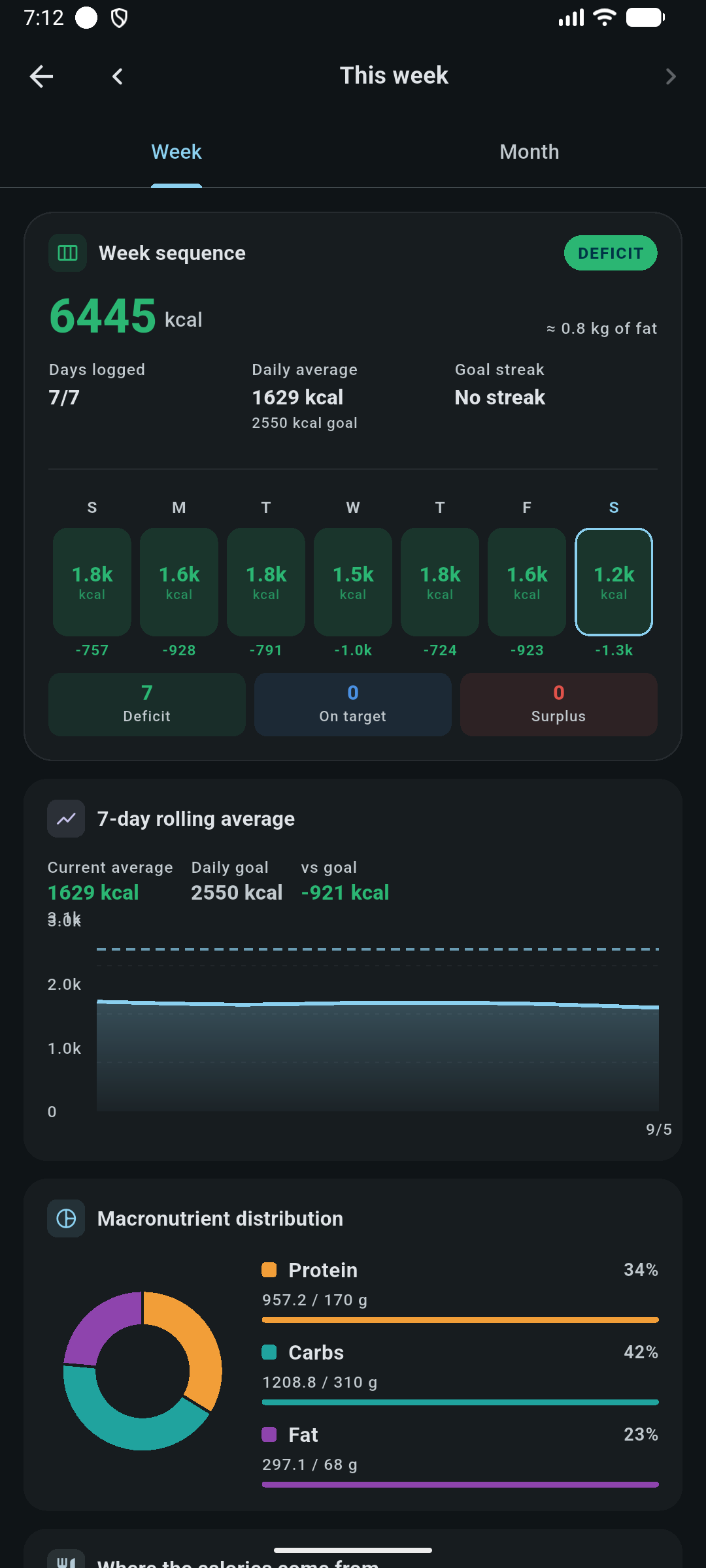
A separate micronutrient summary aggregates the nutrients you have actually recorded, and is explicit about coverage: it will not claim you are low on magnesium when most of your foods never had a magnesium value.
Exports and the AI Coach
- Meal-log history can be exported as CSV, or shared, from the backup actions described in Data, backup & privacy.
- The AI Coach reads nutrition through read-only tools: day summaries, a specific diary day, history, micronutrients, your food library, saved meals and your target profile.
- Creating a food is the one nutrition action the coach can initiate, and it is a proposal: approving it opens the manual food form pre-filled, and nothing is saved until you press save yourself.